Variants & Naming Conventions#
Variants enable Digital Twins to support multiple shapes and appearances with a single asset. Consistent naming is essential for automated processing and intuitive handling by artists.
For this feature to work reliably across Digital Twins, the OpenUSD structure and data must be set up correctly, and the variant sets must follow strict naming rules. Each shape can have multiple shape variants and one configuration variant set.
Shape variants define different states for individual parts or properties of an asset.
Example#
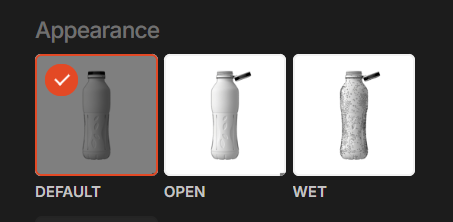
A PET bottle containing liquid can be displayed in several configurations: with the cap closed, without the cap, or with the cap tethered while the bottle remains open. In addition, the bottle can be shown either dry or with droplets on its surface to represent condensation.
In this example, the Cap shape variant switches the cap between the On, Off, and Tethered states. The second shape variant, Droplets, has two possible selections: On and Off.
This results in six possible combinations for the bottle. Often, not all combinations are desired or needed. The configuration variant set provides presets that combine the available shape variants. The image at the top of this chapter shows three presets: Dry, Open, and Wet.
The table below shows the shape variant selections for each configuration variant.
Configuration |
|
|
|---|---|---|
|
|
|
|
|
|
|
|
|
Variant definition in USD#
To support this feature, OpenUSD variant sets are used. Grip looks for variant sets defined on the root prim and all of its immediate children. The names of shape variant sets may be chosen freely (see Naming Conventions), but the configuration variant set MUST be named Configurations.
Variant names are restricted by the naming conventions detailed in the next section.
An example USD skeleton can be found at the end of this page.
Naming Conventions#
Variant names should be consistent throughout your Digital Twin portfolio so that swapping assets in Grip works as seamlessly as possible. Follow the rules below to avoid compatibility issues.
Shape variants#
Names MUST:
use English
start with an uppercase character, with the remaining characters lowercase
contain only ASCII alphanumeric characters (see the list below)
Names SHOULD:
be short, clear, and precise
have a broad application rather than being too specific
The following table lists globally recommended shape-variant names.
Set name |
Variant name |
Description |
|---|---|---|
Cap |
On |
Cap is on/closed |
Cap |
Off |
Cap is off (open) |
Cap |
Tethered |
Cap is tethered |
Level |
Full |
Container is full |
Level |
HalfFull |
Container is half full |
Level |
Empty |
Container is empty |
Droplets |
Off |
No droplets on pack |
Droplets |
On |
Droplets present on pack |
Wrap |
On |
Shrinkwrap on |
Wrap |
Off |
Shrinkwrap off |
Configurations#
Names for the configuration variants must reflect the settings of the shape variants.
Names MUST:
use English
separate words with
_, with each word starting with a capital letter, for exampleDry_Opencontain only ASCII alphanumeric characters and underscores (see the list below)
Because configuration variants can have many valid names, there is no global list. However, maintaining a coherent naming scheme across product categories is strongly recommended.
Appendix#
Example USD#
def Xform "asset"
{
    def Xform "geo" (
        variants = {
            string Configurations = "Dry"
        }
        prepend variantSets = ["Cap", "Droplets", "Configurations"]
    )
    {
        variantSet "Cap" = {
            "Off" {
            }
            "On" {
            }
            "Tethered" {
            }
        }
        variantSet "Droplets" = {
            "Off" {
            }
            "On" {
            }
        }
        variantSet "Configurations" = {
            "Dry" (
                variants = {
                    string Cap = "On"
                    string Droplets = "Off"
                }
            ) {
            }
            "Open" (
                variants = {
                    string Cap = "Tethered"
                    string Droplets = "Off"
                }
            ) {
            }
            "Wet" (
                variants = {
                    string Cap = "Tethered"
                    string Droplets = "On"
                }
            ) {
            }
        }
    }
}
List Alphanumeric characters#
Uppercase letters: A B C D E F G H I J K L M N O P Q R S T U V W X Y Z
Lowercase letters: a b c d e f g h i j k l m n o p q r s t u v w x y z
Numerals: 0 1 2 3 4 5 6 7 8 9
Special characters: - _