DigitalTwin Ingestion Validator#
The DigitalTwin Ingestion Validator (internally newton-digitaltwin-plugin-ingestion-validator) is a specialized plugin
designed to verify that Universal Scene Description (USD) files adhere to INDG/Grip technical requirements prior to
ingestion.
By identifying compatibility issues early in the pipeline, the validator ensures that assets can be processed successfully by the Grip DigitalTwin platform.
Overview#
The validator performs automated checks against standard Grip asset specifications, including:
File naming and structural integrity of USD files.
Material shader compliance (Grip Material rules).
Configuration variant integrity.
Installation#
Where to download#
All digitaltwin and newton-digitaltwin-plugin-ingestion-validator Python package versions can be downloaded
from Grip’s public package index.
Quickstart via uvx.sh#
To quickly get started, the fastest way to install the validator is using uvx.sh by Astral.
This installs the
digitaltwin
command into your ~/.local/bin directory.
For production use, we recommend installing uv and following the instructions below.
CLI only (command-line interface tools):
& ([scriptblock]::Create((irm https://uvx.sh/newton-digitaltwin/install.ps1))) --index https://gitlab.com/api/v4/projects/83627790/packages/pypi/simple --with "newton-digitaltwin-plugin-ingestion-validator"
curl -LsSf uvx.sh/newton-digitaltwin/install.sh | sh -s -- --index https://gitlab.com/api/v4/projects/83627790/packages/pypi/simple --with newton-digitaltwin-plugin-ingestion-validator
CLI + GUI (includes the graphical user interface):
& ([scriptblock]::Create((irm https://uvx.sh/newton-digitaltwin/install.ps1))) --index https://gitlab.com/api/v4/projects/83627790/packages/pypi/simple --with "'newton-digitaltwin-plugin-ingestion-validator[gui]'"
curl -LsSf uvx.sh/newton-digitaltwin/install.sh | sh -s -- --index https://gitlab.com/api/v4/projects/83627790/packages/pypi/simple --with 'newton-digitaltwin-plugin-ingestion-validator[gui]'
Once installed, verify by running (shell restart may be required):
digitaltwin --help
Running via uv#
If you are using uv, you can run the validator with ad-hoc installation.
uv tool run --index gitlab=https://gitlab.com/api/v4/projects/83627790/packages/pypi/simple `
    --with newton-digitaltwin-plugin-ingestion-validator `
    --from newton-digitaltwin `
    digitaltwin --help
uv tool run --index gitlab=https://gitlab.com/api/v4/projects/83627790/packages/pypi/simple \
    --with newton-digitaltwin-plugin-ingestion-validator \
    --from newton-digitaltwin \
    digitaltwin --help
Include the [gui] extra to also enable the graphical interface:
uv tool run --index gitlab=https://gitlab.com/api/v4/projects/83627790/packages/pypi/simple `
    --with 'newton-digitaltwin-plugin-ingestion-validator[gui]' `
    --from newton-digitaltwin `
    digitaltwin validate-gui
uv tool run --index gitlab=https://gitlab.com/api/v4/projects/83627790/packages/pypi/simple \
    --with 'newton-digitaltwin-plugin-ingestion-validator[gui]' \
    --from newton-digitaltwin \
    digitaltwin validate-gui
Installation via uv#
If you are using uv, you can add the validator as a dependency to your python project.
Installation directly from Grip’s public index#
All digitaltwin and newton-digitaltwin-plugin-ingestion-validator python package versions can be installed directly
from Grip’s public package index.
Installing a newton-digitaltwin package version:
# Add from a python project context
uv add --index gitlab=https://gitlab.com/api/v4/projects/83627790/packages/pypi/simple newton-digitaltwin==X.X.X
where X.X.X is the exact version to install.
Installing a newton-digitaltwin-plugin-ingestion-validator package version:
# Add from a python project context
uv add --index gitlab=https://gitlab.com/api/v4/projects/83627790/packages/pypi/simple newton-digitaltwin-plugin-ingestion-validator==X.X.X
where X.X.X is the exact version to install.
Installation from downloaded .whl file#
You can also install from a .whl file previously downloaded from
Grip’s public package index.
# Add from a python project context
uv add --find-links path/to/root newton-digitaltwin newton-digitaltwin-plugin-ingestion-validator
where path/to/root is the folder that contains the downloaded .whl files.
Alternatively, use the UV_FIND_LINKS environment variable:
$env:UV_FIND_LINKS = "path/to/folder"
uv add newton-digitaltwin newton-digitaltwin-plugin-ingestion-validator
export UV_FIND_LINKS=path/to/folder
uv add newton-digitaltwin newton-digitaltwin-plugin-ingestion-validator
Check if installation was successful#
Run
# From a python project context
uv pip list
It should contain the installed newton-digitaltwin and newton-digitaltwin-plugin-ingestion-validator packages once
you have installed both using one of the installation methods described above.
Run
# From a python project context
uv pip show newton-digitaltwin-plugin-ingestion-validator
to get verbose information about the currently installed validator plugin, i.e. install location, installed version, etc.
Installation via pip#
Installing the package via pip works as well. Make sure the .whl file is in your distribution search path.
# Globally or from your activated virtual environment
pip install --find-links [...] newton-digitaltwin-plugin-ingestion-validator [--target <some directory] [--force-reinstall]
Usage#
The validator is accessed via the digitaltwin commandline interface (CLI). It provides 3 commands:
validate-onlyvalidation-bundlevalidate-gui(optional, see below)
1. validate-only#
Use this command to perform batch- or individual USD file validation and generate a detailed report (JSON or HTML).
Syntax:
digitaltwin validate-only [OPTIONS]
Option |
Description |
|---|---|
|
Required. Path to the USD file or directory. Can be specified multiple times. |
|
Required. Absolute path for the generated report file. |
|
Automatically open the report file upon completion. |
|
Skip material shader validation (use for non-Grip material assets). |
|
Skip variant set validation (use for assets without configuration variants). |
|
Skip label artwork texture validation. |
Examples:
Validate a single USD asset and automatically open the resulting JSON report:
digitaltwin validate-only --input path/to/asset.usd --output path/to/report.json --show-report
Validate multiple USD assets and automatically open the resulting HTML report:
digitaltwin validate-only --input path/asset1.usd --input path/asset2.usd --output path/to/report.html --show-report
2. validate-bundle#
This command validates a single USD asset and, upon successful validation, creates a .zip archive containing the
validated source folder and its validation report.
Syntax:
digitaltwin validate-bundle [OPTIONS]
Option |
Description |
|---|---|
|
Required. Path to the USD file or directory to validate and bundle. |
|
Required. Path for the resulting |
|
Skip material shader validation. |
|
Skip variant set validation. |
|
Skip label artwork validation. |
Example:
Validate and bundle a single asset:
digitaltwin validate-bundle --input path/to/asset.usd --output path/to/bundle.zip
3. validate-gui#
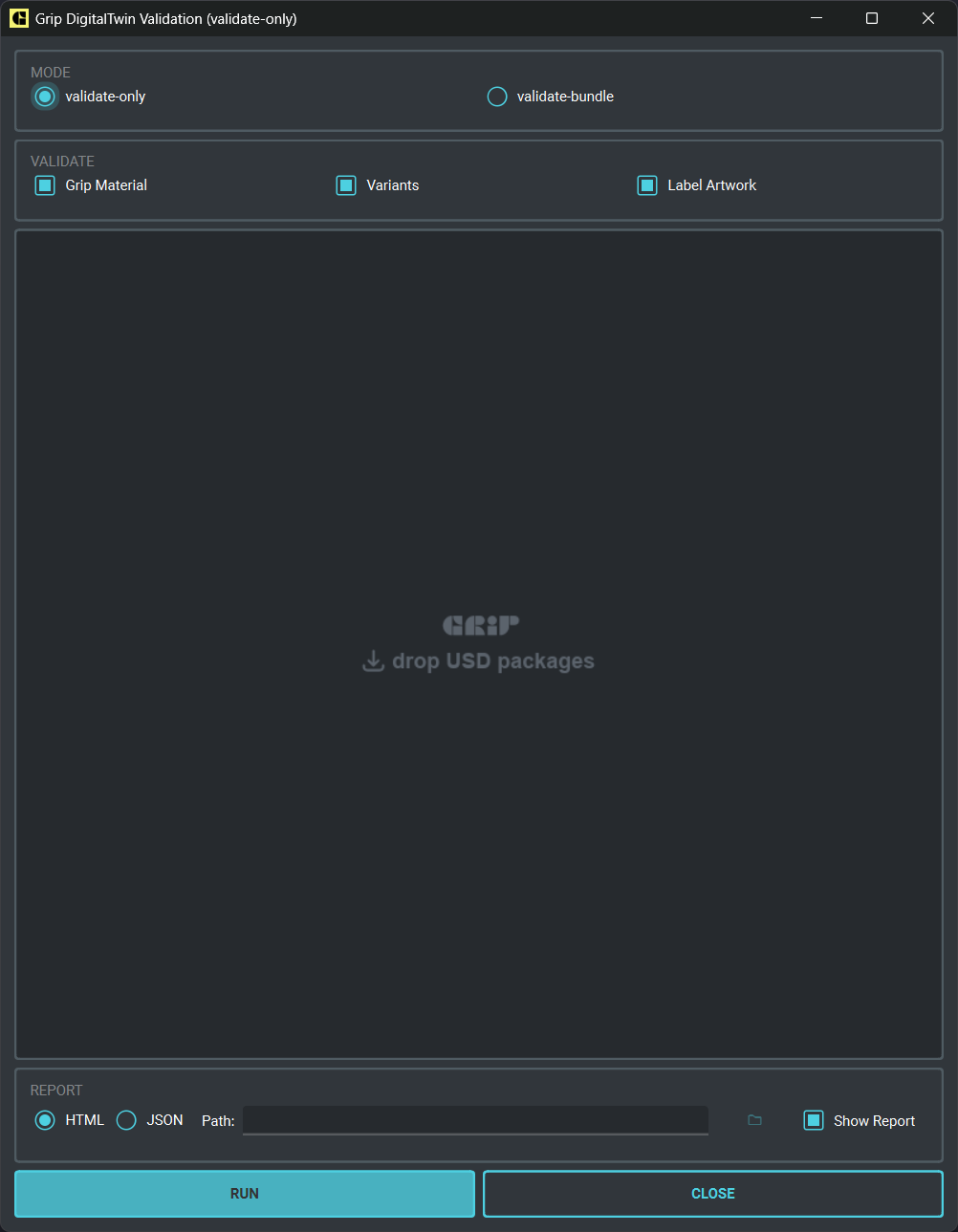
The validate-gui command launches a graphical user interface (GUI). You can choose between validate-only
and validate-bundle modes, and the other options for these commands are available in the GUI. Click the Run button
to run the validation.
Syntax:
digitaltwin validate-gui
Note
To make the validate-gui command available, install the
'newton-digitaltwin-plugin-ingestion-validator[gui]' optional dependency group. See the
CLI + GUI installation or run directly without installing.